

Visual Studio Review: Features, Uses, and Different Versions + Differences from Visual Studio Code
February 15, 2025
What is MSConfig and how do you use it in Windows 11?
February 28, 2025
As a leader in the software industry, Microsoft serves billions of users around the world with its Windows products. In these products, it is of utmost importance to have a strong security system that ensures proper protection against various threats. One of the key tools that Microsoft offers to provide this security to Windows users is Windows Defender.
As the default anti-malware software in Windows, Windows Defender plays a very important role in protecting Windows user systems. This tool not only continuously scans the system and protects against new malware and viruses, but also provides advanced features such as real-time protection, firewall management, and browser protection.
This article comprehensively examines the role of Windows Defender in the security of Microsoft products. From providing the basic basics of this tool to examining its capabilities and performance against various security threats, this guide helps users protect their systems from cyberattacks by making optimal use of this tool.

What is Windows Defender?
What is Windows Defender?
Windows Defender is a security program developed by Microsoft for the Windows operating system. It was initially introduced as an anti-spyware tool in Windows XP and has evolved into a full-fledged anti-malware software that is enabled by default in Windows 8 and Windows 10.
Windows Defender's primary function is to protect user systems from malware, viruses, spyware, and other security threats. It uses updated algorithms to detect and eliminate new threats, and it is constantly updated to deal with new security threats.
The main features of Windows Defender include the following:
- Scan and remove malware: Windows Defender scans the system by default to detect and remove malware and viruses.
- Real-time protection: This program is active in the background by default and tries to identify and block any unwanted input in real time.
- Firewall managementWindows Defender also plays a role in managing the system firewall and attempts to limit unwanted access to the network.
- Browser protection: This program also protects Internet browsers and tries to prevent dangerous websites and downloads.
- Optimal performanceDue to its integration with the Windows operating system, Windows Defender generally has little impact on system performance and users do not need to install third-party anti-malware software.
However, for users looking for more advanced features, they may need to use third-party anti-malware software that offers additional features, including behavioral monitoring and more advanced firewall management.
History of Windows Defender
History of Windows Defender
Windows Defender was originally known as Microsoft AntiSpyware. In an effort to provide more security to Windows users, Microsoft acquired GIANT AntiSpyware on December 16, 2004. The service was developed as an anti-spyware tool to combat spyware and spyware Trojans.
After purchasing GIANT AntiSpyware, Microsoft rebranded it as Microsoft AntiSpyware. It was offered to Windows XP and Windows Server 2003 users and was responsible for detecting and removing spyware and malware that collected personal information.
Then, on October 24, 2006, Microsoft decided to make Windows Defender a default feature built into Windows Vista. This change meant that Windows Vista users had a powerful anti-malware and anti-spyware tool by default.
Since then, Windows Defender has been continuously improved and expanded. Today, as Windows Defender Antivirus, it is known not only as an anti-malware but also as a comprehensive security solution for Windows that uses continuous update mechanisms and advanced security technologies to protect users from various security threats.
Advantages of using built-in antivirus (Windows Defender)
Advantages of using built-in antivirus (Windows Defender)
✔️ Automatic scanning and updating
Windows Defender in Windows 10 is set by default to automatically scan the system. This scan includes checking downloaded files, running programs, system files, and RAM.
Automatic scanning allows Windows Defender to be continuously updated, identify new threats, and take action to remove or repair them.
Windows Defender also updates automatically to ensure that the software is up to date with the latest security and virus detection fixes. Automatic updates include virus signature updates, algorithm updates to better detect the latest threats, security database updates, and general security updates.
✔️ Trusting files
Windows Defender allows the user to review files that are identified as suspicious and decide whether to trust or deny them. This feature allows you to remove the files you need from quarantine and access them.
✔️ Manual scanning and its types
In addition to automatic scanning, Windows Defender also allows the user to perform manual scans. This can be useful for a more thorough or immediate check of specific files or areas of the system.
✔️ Quarantine
If Windows Defender detects a file as a threat, it quarantines it to prevent it from running and causing harm to the system. The user can use Windows Defender Quarantine to examine the files and, if necessary, free or delete them.
✔️ Possibility of automatic replacement with external antivirus
Windows Defender is enabled by default as a built-in antivirus in Windows 10 and is updated regularly. However, if the user chooses to use an external antivirus, Windows Defender is automatically disabled until the external antivirus is installed and enabled.
Given these benefits, using Windows Defender in Windows 10 allows users to benefit from a comprehensive and effective security solution to protect their system from security threats, while maintaining optimized Windows performance.
How to enable and disable
How to enable and disable
To enable or disable the built-in antivirus, Windows Defender, in Windows 10, you can use the following steps:
First, you need to open Windows Security. To do this, search for and open “Windows Security” from the Start menu at the bottom left of your Windows screen.
In the Windows Security window, scroll down to the “Virus & threat protection” section and click on it.
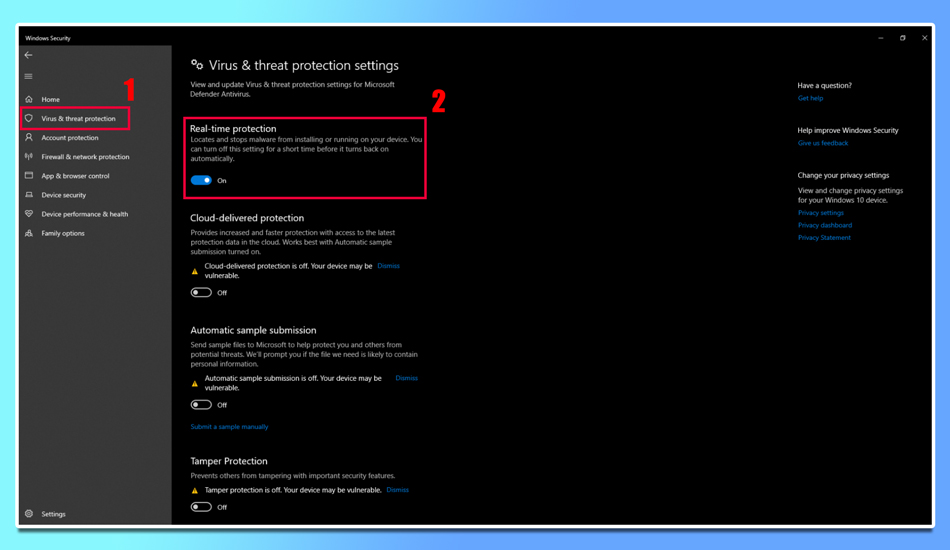
On the next page, go to the “Virus & threat protection settings” section and click “Manage settings.”
In the “Tamper Protection” section, make sure that this feature is disabled. To do this, click on the “Tamper Protection” section located in the Virus & Threat Defense settings and select Defender for
Using Windows Defender
Using Windows Defender
Windows Defender is a core security service included in the Windows operating system and performs several tasks that are primarily related to the protection and security of your computer system. Below are some of the uses of Windows Defender:
Protection against viruses and malwareBy default, Windows Defender scans for viruses, Trojans, worms, dangerous scripts, and other malicious software and protects the system from them.
Prevent security breaches: This service monitors potential intrusions into your system and attempts to strengthen system security by identifying and blocking them.
Protection while browsing the webWindows Defender monitors browsers and tries to prevent viruses and Trojans from entering your system through malicious websites.
Protection from email security threats: By default, this service identifies and cleans email files and attachments from security threats to ensure security and privacy.
Parental management and controlWindows Defender provides tools to manage and control children's online activities, including content control and website filtering.
Scan and clean suspicious files and softwareUsing various scanning tools, Windows Defender allows you to check for suspicious files and clean them from the system.
Windows monitoring and system performanceWindows Defender provides you with reports and monitoring of system performance and security so you can check the overall status and health of your system.
These uses and capabilities of Windows Defender make this service one of the main and effective tools for protecting and securing Windows computer systems, ensuring users that they have the best protection against various security threats.
As one of the main security tools in Windows 10 and newer editions, Windows Defender plays a very important role in maintaining the security and privacy of users. With a variety of features it offers, including protection against viruses, malware, Trojans, and other threats, Windows Defender ensures users that their systems are protected against malicious attacks.
With features such as automatic and manual scanning, system performance monitoring, and various file scanning capabilities, Windows Defender allows users to easily and confidently take care of their system security. Also, the ability to integrate this service with the Windows operating system makes this tool more convenient and practical due to its high integration.
Using Windows Defender as an essential link in the security chain of the Windows operating system is an important recommendation for all users looking for an effective solution to maintain their security and privacy.