Buy an original Project Server license
Microsoft Project Server provides a comprehensive solution for project-oriented organizations and teams by providing powerful project management, resource planning, and schedule control tools. With capabilities such as team coordination, intelligent resource allocation, advanced reporting, and full integration with the Microsoft ecosystem, Project Server increases productivity and enables precise project management from start to finish.


Legal and lifetime activation

Advanced security and data protection

Direct support from Microsoft
In today’s competitive environment, one of the most fundamental needs of managers and business owners – whether in large companies or small organizations – is the ability to effectively plan, control, and manage ongoing activities at the organizational level. This need is not limited to day-to-day project management, but also includes measuring the alignment of the performance of different parts of the organization with the goals and strategies. In such an environment, accurate decision-making depends on a correct understanding of the status of projects and tasks assigned at different levels of the organization.
In practice, these tasks can be defined as small, scattered activities across different employees and departments within an organization, or as structured, multi-sector projects at the macro level. As an organization’s scope of activities expands, goals diversify, and data volumes increase, the process of monitoring and controlling projects becomes more complex. For this reason, organizations need tools that can analyze and manage performance information in real time, in an integrated manner; a tool that provides managers with a comprehensive view of the status of projects and enables fast, targeted decision-making.
Microsoft Project Server is designed and developed with exactly this goal in mind. This powerful solution allows project managers to monitor each activity and task defined for individuals in different units, monitor the progress of each project in real time, and ultimately evaluate the achievement of micro and macro goals of the organization. The flexible and scalable features of this platform make it an ideal choice for organizations that are looking to carefully structure, coordinate resources, and optimize the performance of their projects.
Microsoft Project Server is a professional, on-premises solution for project and portfolio management (PPM) that goes beyond file-based desktop software. The unique capabilities of this system cover all management roles and project management styles, helping organizations achieve greater productivity, greater control, and more effective strategy execution.

Project Server 2019

Project Server 2016


Key Benefits of Using Project Server in Enterprise Project Management
Microsoft significantly expanded the capabilities of the project (MSP) by providing the project server and the web version of the project called PWA. Microsoft Project Server stores project information in a central SQL database and protects against unauthorized access and possible failures. Project server admin user can control and manage user access.
The project center provides the possibility of reporting the information of an organization's projects at the project level. Project managers can enter the details of a project. It is possible to define custom organizational fields for tasks, projects and resources. (This possibility was also available in Microsoft Project (MSP) for a project.)
The project manager needs to be able to distribute the project tasks among the team members and interact with them regarding the project plans. Project tasks are distributed among team members through the PWA homepage. Team members should inform the project manager of the latest status of the tasks assigned to them. Microsoft Project has enabled electronic interaction between team members and project managers, and team members can update the status of their tasks through PWA and my task list or time sheet.
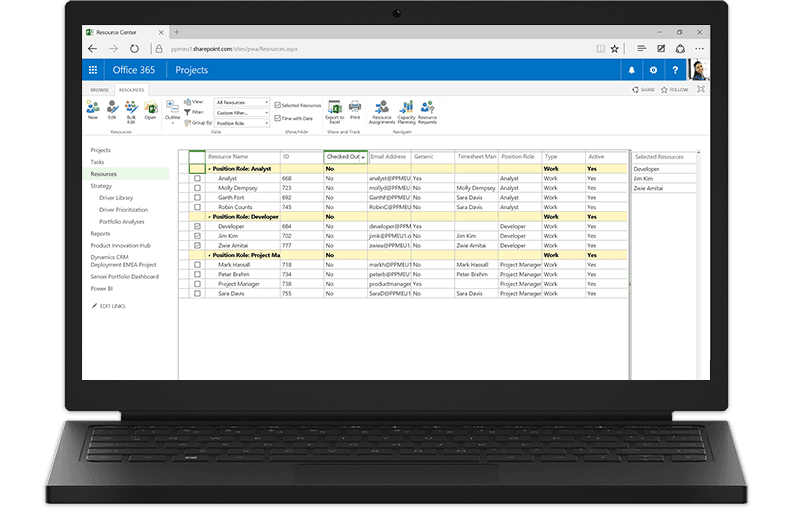
The ability to analyze the amount of work that can be done by project resources, both at the project level and at the resource level, is provided in the "Resource Center" of Microsoft Project Server. This capability enables organizations to predict the resources needed in the future and use the existing resources effectively.
Defining views in PWA is much easier and more powerful than in Microsoft Project (MSP). Project Server stores customizations for calendars, views, tables, filters, and fields in an Enterprise Global area, and each time users reopen Project (MSP), they receive the latest version stored in this Enterprise Global area, thus protecting against unwanted changes to organizational standardizations.
A project workspace is created for each project published in the project server. The project workspace is a SharePoint team site where project members can share project documentation, problems, and risks.
Key features and capabilities of Microsoft Project Server

Project Server is a server-based project management solution developed by Microsoft in 2000. It is used to manage all projects and resources of an organization. It is a highly flexible and scalable solution that uses Microsoft SharePoint as its foundation. This solution is available everywhere. Project Server also includes familiar tools that increase efficiency and speed of work.
It is supported through two types of user interfaces:
Microsoft Project software (MSP)
Web browser (connected to Project Web App - PWA- author)
Over time, the use of integrated project management methods in companies and organizations that have different structures is one of the competitive advantages and one of the main factors that senior managers, experts and consultants have considered. In this way, all people who participate in projects, based on their position and responsibility, should be able to send and receive information related to the project online and on the web in the language of the project. In this case, the way of influencing and communicating with the whole project becomes very easy and accurate.
Therefore, the main secret to the success of a project manager can be considered to be having sufficient information during the project implementation period. Secondly, correct, fast processing and accurate performance in preparing control indicators are important. Therefore, Project Server is a suitable solution for implementing integrated project management approaches. This tool has the ability to store, produce, collect, classify, process, publish and update information to project managers and other people in the organization and is a suitable solution for achieving program goals in the shortest time, lowest cost and highest quality. Microsoft Project Server is a comprehensive project management solution that was launched by Microsoft in 2000.
This software is implemented on the SharePoint platform, which Microsoft has extended with Project Server and Project Web App. This software protects project information in a central SQL server, and the project manager can define users and the access conditions of each user to the database.
In today’s world where project success directly impacts business results, Microsoft Project Server provides a powerful solution for managing projects, resources, and enterprise portfolios. With features like intelligent scheduling, accurate resource allocation, analytical reporting, team collaboration, and seamless integration with Microsoft 365 and Power BI, this platform helps you achieve effective control and data-driven decision-making.
As the official representative of IT Researches (Ryannet Private Joint Stock Company) in Iran, we are the exclusive provider of the original Project Server license. Buying from us means benefiting from the authenticity of the product, security in use, and expert support throughout all stages of implementation and operation.

24/7 support

Instant delivery

Project Server
A flexible solution for project portfolio management (PPM) and everyday work.
Flexible project portfolio management
Microsoft Project Server is a flexible on-premises solution for project portfolio management (PPM) and everyday work.
Access anywhere
As part of SharePoint (licensed separately), Project Server enables team members, project participants, and business decision makers to get started quickly, prioritize project portfolio investments, and deliver the intended business value from virtually anywhere.